Connect 4
ReleasedVersion 1.0
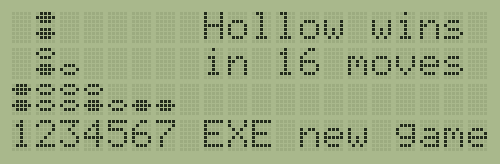
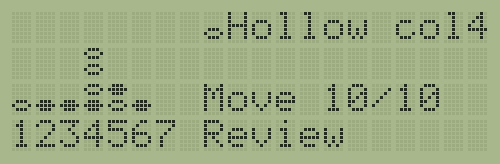
Connect 4 against the Organiser or a friend, with a coach, on two-line and four-line screens.

Download
Build: pack image
- File
connect4-1.0.opk- Version
- 1.0
- Size
- 28,450 bytes
- Date
- SHA-256
284784c4a7e80525655758abd2c2916ac76954577d07c6bfba89e68647eeb2c4
Source + build (zip)
- File
connect4-1.0-source.zip- Version
- 1.0
- Size
- 553,691 bytes
- Date
- SHA-256
54aae90d3c2b9c72c42bdf991a4734fa2dc94bbaf51a9478d3aebfa1d7903038
One 32K Datapak serves every model. In an emulator, load the pack image into slot B. On a real Organiser, write the image to a 32K Datapak, or load the psion/ folder from the source + build zip with RPBOOT.
Licence: MIT.
Compatibility
| Model | Runs it? | Note |
|---|---|---|
| CM | Works | Two-line screen |
| XP | Works | Two-line screen |
| LA | Works | Two-line screen |
| LZ | Works | Four-line screen |
| LZ64 | Works | Four-line screen |
Tested on the Jape emulator: CM (ROMs 2.4, 2.6, 3.3), XP (2.4, 2.6, 3.1), LA, LZ and LZ64, and random-key runs on all 29 Organiser ROMs it has. Real hardware checks are still to do.
About
Connect 4 for every Organiser II model on one 32K Datapak. The launcher reads the model and loads the screen code for a two-line or a four-line display; everything else is shared, so the game plays the same on every model.
You can play the Organiser at eight levels (or Auto), play a friend with move timers and game clocks, or watch a demo. The opening book was made by my own perfect solver and checked against John Tromp's database, and the engine is 6303 machine code matched position for position against a JavaScript reference.
There is a coach that names a bad drop before you make it, take back, hints, a move list, a review that marks the moves that threw away a win, export and import of games, and save and resume after every move.
Install
- Download the pack image,
connect4-1.0.opk. - In the Jape emulator: Select OPK file, choose the file, Create, then Slot B.
- On the Organiser: Prog, Run, then type
B:C4and press EXE. - For a real Organiser, see Getting started for writing a Datapak or loading with RPBOOT.
Manual
| Key | Action |
|---|---|
| LEFT RIGHT | Choose the next column with room |
| EXE or DOWN | Drop the disc. With the coach on, a drop that misses a four or lets one in is named first; press again to drop it |
| 1 to 7 | Choose that column (no SHIFT needed: the keys U V W O P Q I) |
| DEL | Take back your move, and the reply |
| SPACE | Hint: a short search, about 2 seconds |
| MODE | Ask the coach |
| UP | The move list |
| ON/CLEAR | The menu, which has Review game |
| Any key while it thinks | The Organiser moves now |
In menus, UP and DOWN move, a letter jumps to the next item starting with it, EXE takes the item and ON/CLEAR goes back. In the settings, LEFT and RIGHT change a value.
Modes: one player (levels 1 to 8, or Auto), two players, demo. Two players adds a move timer, game clocks, the swap rule, a match score and player names.
Review: LEFT and RIGHT step through the game, UP goes to the start and DOWN to the next marked move: "Win -> loss", "Missed a win", "Allows four" or "Allows fork".
Technical notes
- The game needs about 4,660 bytes of free RAM; a blank CM has room to spare and keeps 33 exported games.
- The program takes about 28K of the 32K Datapak.
- The engine searches about 280 positions a second, and level 8 solves most endings with 16 to 18 empty cells.
Changelog
| Date | Version | Change |
|---|---|---|
| 1.0 | First release. |
Source
The source is in the source + build zip, under the MIT licence. It holds the program as committed, the shared Psion tools it builds with, and the built pack, and it rebuilds the same pack byte for byte. A public repository will follow.